There isn't a week that goes by without us making some small improvements to how SpellMe works. Recently the changes were a bit more significant. Regular users will notice that there have been two major changes. The first was to the performance tracking and the second was to how the settings look.
Performance Tracking Update
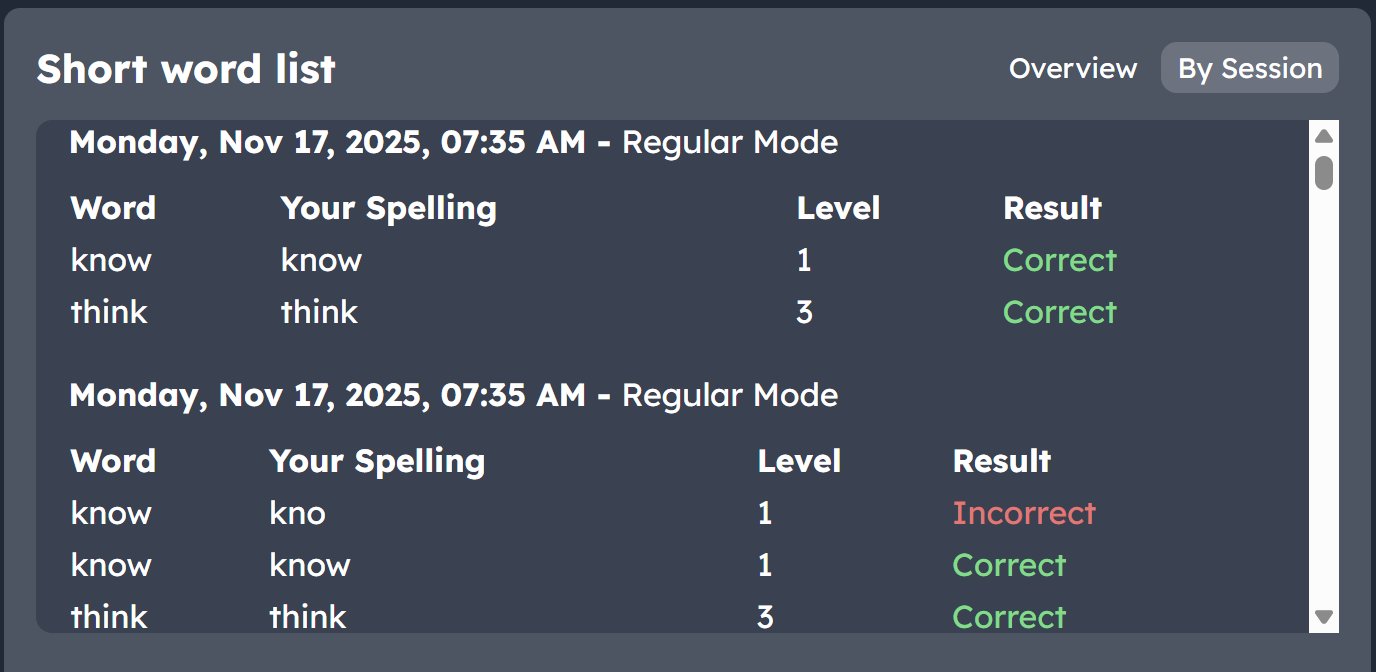
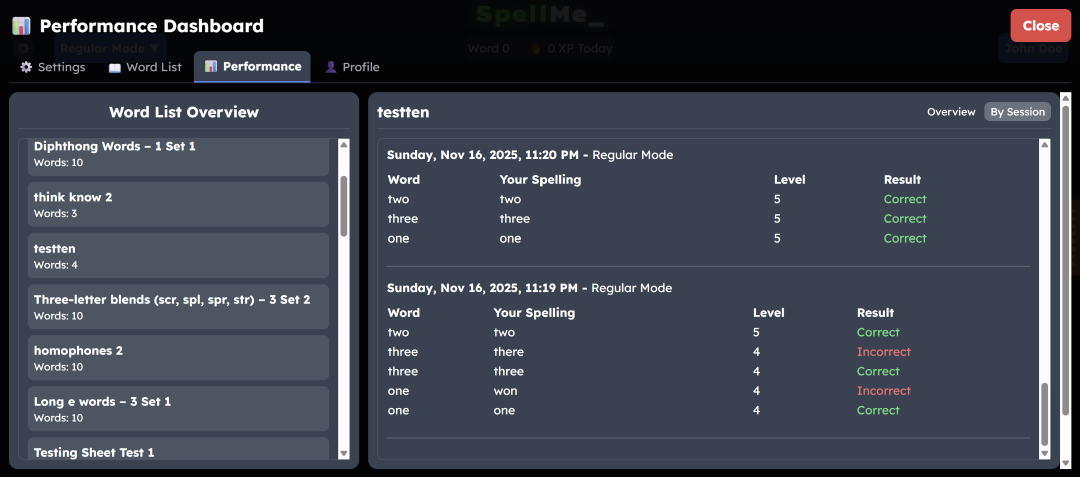
The speller's progress can now be tracked session by session, separated by date and time, instead of just by viewing the word list performance as a whole. You can now see each time the speller completed a round of spelling, and can see which mistakes were made, what those mistakes were, at what level each word was when the mistake was made, and when it was finally spelt correctly. This allows student progress to be monitored at each point, even when the student is working independently.
Settings Views Update
 |
 |
 |
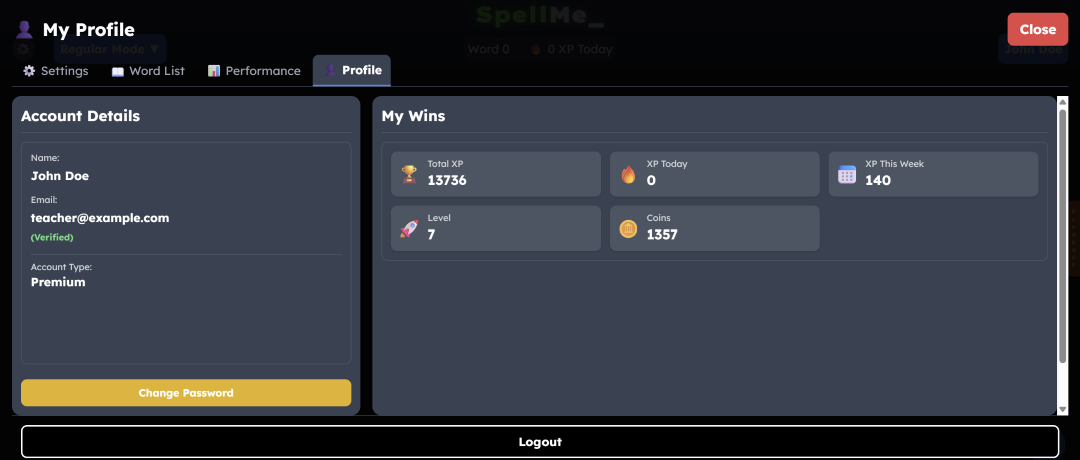 |
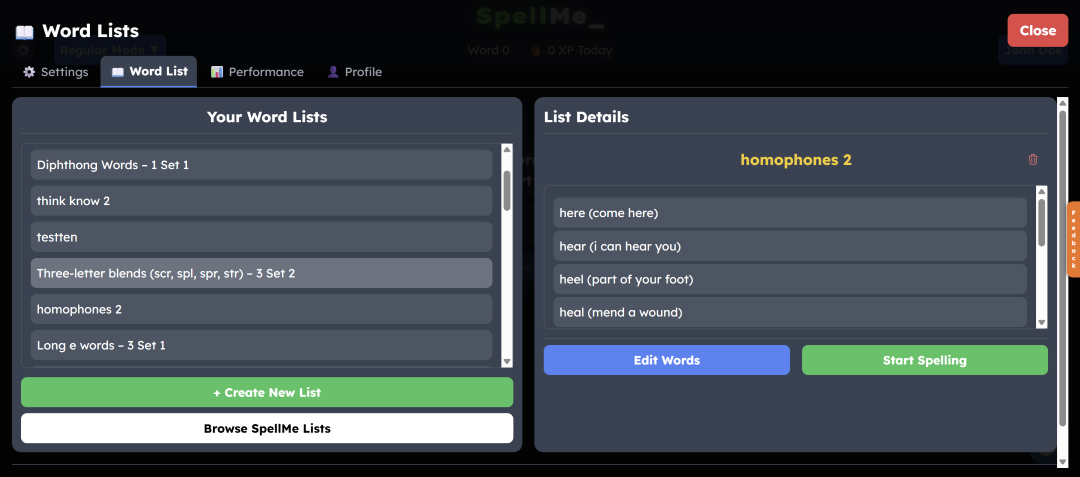
The four settings menus, Settings, Word Lists, Performance and Profile, have now all had a new lick of paint. Instead of the old view which was a little cramped, the new design now uses the whole screen, showing more information at a time. The mobile views have also been improved, giving users more usability on smaller screens. It is still ideal to use SpellMe on a larger computer screen, however, small screen users should now have a better experience. Check it out and let us know what you think.
The main idea of the updates is not just to make them look better, but to make them as accessible to the parents and teachers as they are to the students who are learning with them. I have written about accessibility for ADHD and dyslexia students in previous posts, like The Ideal Op App: 6 Features for Creating the Best Literacy Learning App for Learners That Need More, and Fonts, Frustration, and Finding What Actually Helps Kids Read and more recently, The Science Behind SpellMe - Part 2: UI. These all focus on what the learner needs. However, parents and teachers who may or may not also have neurodivergent traits and manage the learning experience, shouldn't be left out. These updates are for you, too. There have been many other updates recently, and there will be a few more as we build up to the next release in early 2026. Stay tuned and see if you can spot them, big or small.
From “look-say” to decoding: why SpellMe still lists sight words

What is the problem?
A quick look through the SpellMe word lists, which are based on Structured literacy/Phonics will show a number of sight words by Dolch and Fry. This doesn't really make sense! Structured literacy is a process that teaches reading and spelling step-by-step, linking sounds to letters and word parts, in a clear, ordered way with regular checks (check out my post on The Science Behind SpellMe - Part 1: Word Lists for more on this). Sight words are - or at least were - not supposed to do that. So what is going on…?
What were sight words?
Sight words were supposed to be lists of words that were learned by memorization, without sounding out, with the intention of being instantly identifiable. Although there were many kinds, I am focusing on the Dolch's and Fry’s lists (info in the additional links section) as those are the ones that are included in the SpellMe word lists. These lists were curated when look-say/whole-word contexts (the precurser to whole language methods) were being used for literacy, Dolch in 1936 (updated 1948) and Fry in 1957 (updated 1980).
However, it was later found that whole language learning was not as helpful as people thought in teaching kids to read. Large reviews concluded that phonics and structured literacy were more effective. Over the years a move to structured literacy became the norm for many educators and the method of whole language was replaced. But sight words still remain?
This was very confusing for many (including me). So what is the situation?
Why are they still used?
Well sight words are still important, but their meaning has changed. They are no longer a list of words that should be learned by rote, but they are words that can be recognised automatically after mapping. They still need to be learned using structured literacy methods of linking the phoneme and grapheme of the words together. But once that has been learned, students should be able to identify them without having to go through that decoding process again. So eventually, every word should be a sight word.
Let's clarify the naming a bit further. Many sight words are also known as high frequency words, which are words that are used most often in the English language. For example 'and', 'in' and 'it', which are all regular words so can be easily decoded using phonics. However, some of these are irregular, such as 'said', 'was' and 'one', and are then known as heart words, because parts of the words need to be memorized (due to their irregularity). There are very few heart words that are fully irregular. Most have parts that can be decoded, like the 's' and the 'd' in 'said' but parts parts like the 'ai', cannot. So, although these three terms - sight words, high frequency words and heart words - are often used interchangeably, they are quite different.
So to clarify,
- Sight words are words recognised instantly after mapping
- All words become sight words through orthographic mapping, which is grapheme–phoneme bonding, not visual-shape memorization
- Included within these are heart words and high frequency words with phoneme–grapheme analysis where possible but the irregular parts are still recognised and highlighted.
So, that is why you will find both Dolch and Fry sight words among the SpellMe word lists. Identifying and spelling high frequency words is extremely important for reading fluency and spelling literacy. Check them out and feel free to use them for your teaching and practice sessions.
Additional Links
- Dolch Sight Words
- Fry Sight Words
- Why Johnny Can't Read - A critique of the old look-say method of learning to read
- Implementing Structured Literacy - Teaching High Frequency Words
- Reddit discussion 1 about sight words
- Reddit discussion 2 about sight words

Two ways I use AI
I have come to use AI in 2 main ways. Either quickly to an adequate quality, or slowly and in depth to a much higher quality. At the beginning of developing SpellMe, it was method one. This allowed me to get a very good prototype in the hands of my then 7 year old son, in a matter of weeks. It was basic, and rough around the edges, but it worked. However, the longer the project progressed and the more complicated it got, the less I was able to rely on it for good quality solutions. I found that a combination of code size, more complicated features and limited context windows all contributed to making continued reliance on AI much more difficult. This is where my prior knowledge of software development had to kick in and I started to rely on method 2 much more.
Possible without AI?
Would I have been able to create SpellMe without code provided by ChatGPT? Definitely! This is not my first web-based tool that I have created. Wurkbuk is way more complicated. I can confidently say that I understand every line of code, and every algorithm that is used. So if AI assistance were to go tomorrow, I could confidently continue. But it would take me longer for a number of reasons, and I think it is important to explain why.
My coding strengths and limits
I have taught various different programming languages at secondary level (up to and including A-Level) in the past and have written text books for Python. So I would say I am good at coding, verging on very good, as I have a knack for understanding and creating quite complicated algorithms. However, I wouldn’t really call myself great. For that I would need to have experience of coding using a wider range of frameworks, using different methods and techniques as well as a good memory of syntax and an understanding of functions specific to the languages I am using at any particular time. That is not me. Before generative AI, I would have used W3Schools for guidance on syntax, Stack Overflow or github repos for problem solving and code examples, as well as the general reference websites for whichever specific language I was using, like PHP.net. If there was an algorithm I needed, I would first consider how long it would take me to create it myself and compare that with how long it would take me to find the code online. The shortest and easiest route would usually win, depending on the quality needed.
Not always perfect
Now, generative AI is here! As all these code repositories and websites have already been fed into Large Language Models, generative AI becomes a great search engine and generator of code. It is not perfect, but in a lot of cases it is more than good enough, if you don’t come across one of these two issues.
- The platform/framework that you are coding in has limited or very poor quality documentation (hello, Joomla! At least you used to).
- Hallucinations, where generated code is just trash.
In both cases, you just have to get down and dirty and do it yourself.
Why vibe coding didn’t work for me
Even at the early stages, where the code was mostly generated by AI, I can’t say it was led by vibes. The difference is, with vibe coding, there would pretty much be 100% reliance on generated code, without even checking what it was. AI would be used entirely and the user could forget that code even existed. I don’t have anything against people that use this method, but it did not work for me. It led to too many errors, and took far too long resolving them. I found it much more simple to do a lot of it myself and manage the process much more closely. These are some of the issues that I faced.
- Algorithms were just plain wrong.
- Algorithms were very inefficient.
- Sometimes code was in the wrong language.
- Lack of code continuity with variable names not consistent throughout
Collaboration wins
These are the negatives. However, there were huge positives for a developer like me. The first was collaboration. Instead of asking for full code, I would ask for research on the best methods with external sources as evidence and example methods. I would then have a back and forth discussion about those methods with the AI going over pros and cons. These discussions would sometimes go on for a while, with me feeding in information on the kind of code that I wanted, how I wanted to use it in the future and potential expandability. Code generation was then much more modular, where I would ask the AI to generate parts of code, or merge code more seamlessly.
There were also times where I simply didn’t know how to realise certain features in code. E.g. login logic. Through the generated logic, I was able to study it, understand how it was done and how it could be improved.
AI as a Teaching Tool for Coding
This method not only worked perfectly for me as an experienced coder who wants to learn more, but it can definitely work as a teaching method for computer science classes. Instead of having students get AI to generate code blindly, have them describe what they want, give examples and make students check the code generated line by line to ensure understanding. Have the students request that a certain coding method is used that they know nothing about and have the AI teach them how to use it and incorporate it into generated code. Then have the students share their conversations with the teacher who can then check that things were done properly. This can work for essay writing just as well as code.
Beyond Coding: Research, Marketing, Editing
Coding was not my only use of AI. I used it for research, for advice on marketing and copy editing for the landing page and other pages. I even used it to help edit blog posts. Just like with the coding, every line was checked and a lot of it was amended. But using AI to create the foundation that I can then perfect and specialise, is such a time saver. And for someone as solitary as me, using it as another set of eyes, to check for spelling, punctuation and grammar saves a lot of embarrassment. As I said in the beginning, it can often take longer but it leads to better quality output. As AI develops, so will the number of ways it can fit into people’s workflows. As long as I remain at the centre of mine, I’m happy.
Taking a look under the AI hood

In my personal blog, 21st Century Chalk, I talked in some detail over two posts about AI in society in general and AI in the education sector more specifically. For a longer look at my thoughts and research, check it out. But in summary, I mentioned how it is a great technology, but not the saviour of all things that some may be professing it to be. I highlighted many of its issues and described its shortcomings. And in this age of data-hungry systems, it is important that people know what they are using and how they are being used. After all, ‘if you are not paying for the product, you are the product’.
It is for this reason that I think it is important for developers to be open about their data use, and in this current era, their AI use. And not just with how their apps use AI, but also how they used AI to develop their apps.
The Three AI Features
1. The first implementation of AI is in Story Mode. The words from chosen word lists are fed into an AI, along with some optional prompt words and a story is generated that the user can spell along to.
2. The second implementation is in the daily challenge word definitions. This is a minor use of AI but extremely useful. Once a word is spelt correctly, the word is first fed into Merriam Webster dictionary API to fetch the definition. The definition that comes back is usually written at too high a level for younger spellers to understand so the definition is then fed into an AI to rephrase the wording, making it more accessible. It also generates an example use for that word, for further understanding. This is extremely useful for many red and black level daily challenge words.
3. The final implementation is the smart hints system. This is only available when you get a word wrong. It is most useful after repeated errors as it takes all previous errors and information about the word list and the AI generates some advice for the speller. This has the potential to be very useful depending on the learner and the teacher managing the learning.
My need-based approach
I am considering other AI uses, but with care. There are a lot of features that I thought would be totally controlled by AI in SpellMe, but they are not. For example Mastery mode, where the word levels dynamically change depending on student performance, is done with zero AI. I don’t even think using AI would enhance the feature.
There are far too many apps and companies forcing AI into their products just for the sake of it, without that feature being useful to anyone or anything. It’s a tool looking for a problem to solve, rather than a tool for an existing problem. Not everything needs AI. So, for now this will be all the AI features that will be implemented in SpellMe. Any others will undergo scrutiny to see if a clever algorithm can do the same job or if it is even necessary. There will be no AI-powered emojis for me! (at least not yet :P)
In my next post I will discuss how I use AI to develop SpellMe, and the difference between vibe coding and collaborative AI coding.
Let’s talk about where SpellMe is right now. It is currently a Beta 2 version, which means it is open for you to use, but still under development. Not only are there some features missing, but others are not totally complete, and there may be some bugs here and there.
The things that are still being worked on include, the experience points, badges and coin systems, the SpellMe wordlists for levels 3 - 6, the smart hints and some UI features. About 90% of the SpellMe features work just fine and include the regular, mastery, story, game modes and everything else. You can find out more about how to use those in the help section. This is not an exhaustive list, but just an example of what I will be working on during the Beta 2 period.
The plan is for this Beta 2 period to last only the next 3 months, so by January 2026, the final Beta version, Beta 3 will be launched and all the features I listed above will have been implemented (and maybe a few more), all bugs fixed and SpellMe will be working great! The final release will come shortly after that.
Now is still a great time to register, as it is totally free to use all the current features in the Premium account. If you do, you can help influence the development of SpellMe. I would love to hear your opinions. So, if you have not signed up for SpellMe, then give it a go.
Happy spelling!